Your first circuit
This tutorial takes you from an empty directory to a working 4-bit adder. You write a half adder, look at the primitive netlist the flattener turns it into, drive it from Python, and then compose it into a full adder and a generated multi-bit adder. Along the way you meet the idea that makes SHDL different from most simulators: every gate takes one cycle, so you can watch a result form.
You need PySHDL installed (see Installation). Create an empty directory and run every command and script on this page from inside it.
Write a half adder
A half adder adds two bits. The sum bit is A XOR B; the carry bit is A AND B.
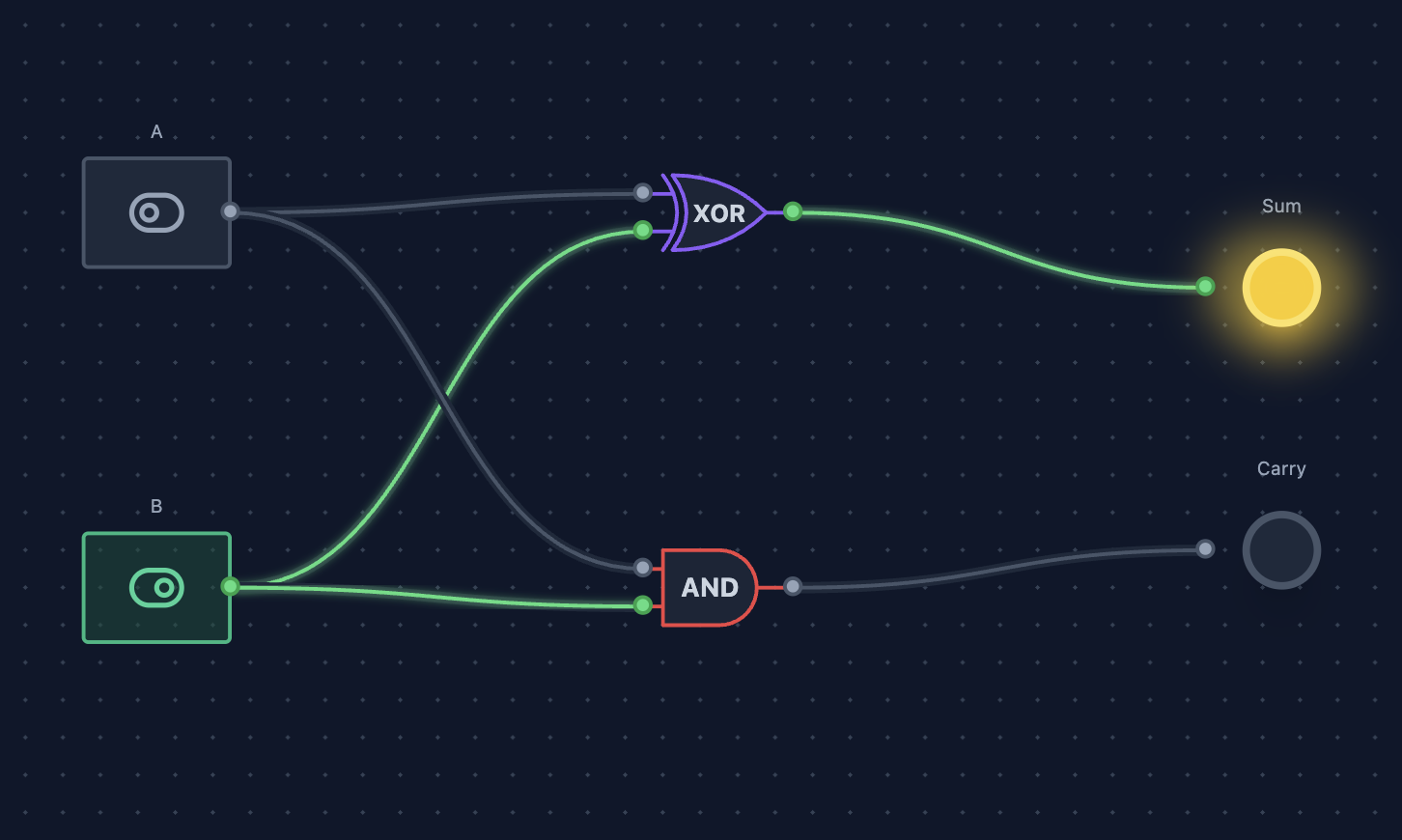
Save this as halfAdder.shdl:
"""A half adder: adds two bits."""

top component HalfAdder(A, B) -> (Sum, Carry) {
    x1: XOR;
    a1: AND;

    connect {
        A -> x1.A;  B -> x1.B;  x1.O -> Sum;
        A -> a1.A;  B -> a1.B;  a1.O -> Carry;
    }
}
Piece by piece:
| Part | Meaning |
|---|---|
"""...""" | A module docstring. It is kept in the metadata as the circuit's description. |
top component HalfAdder(A, B) -> (Sum, Carry) | A component with inputs A, B and outputs Sum, Carry. top marks the component to build when this file is compiled directly. |
x1: XOR; | An instance named x1 of the primitive XOR gate. |
connect { ... } | The wiring. Each source -> destination; statement is one connection. |
x1.A, x1.B, x1.O | The pins of a two-input primitive: inputs A and B, output O. NOT has a single input A. |
SHDL has four logic primitives, AND, OR, NOT and XOR. Everything else, including NAND, NOR, adders and whole processors, is built from them. See Components and Standard gates.
Flatten it to Base SHDL
Nothing in the toolchain simulates SHDL directly. The flattener first lowers it to Base SHDL: a flat netlist of single-bit primitive gates, followed by a JSON meta block that records what the flattening threw away (port groupings, hierarchy, source locations, timing). Run it yourself:
$ shdl-flatten halfAdder.shdl --timestamp 2026-01-01T00:00:00Z
component HalfAdder(A, B) -> (Sum, Carry) {
    x1: XOR;
    a1: AND;

    connect {
        A -> x1.A;
        B -> x1.B;
        x1.O -> Sum;
        A -> a1.A;
        B -> a1.B;
        a1.O -> Carry;
    }
}

meta {
  "version": "2.0",
  "ports": {
    "inputs": {
      "A": [
        "A"
      ],
      "B": [
        "B"
      ]
    },
    "outputs": {
      "Sum": [
        "Sum"
      ],
      "Carry": [
        "Carry"
      ]
    }
  },
  "hierarchy": {
    "HalfAdder": {
      "source_file": "halfAdder.shdl",
      "source_line": 3,
      "instances": {
        "x1": {
          "type": "XOR",
          "gate": "x1"
        },
        "a1": {
          "type": "AND",
          "gate": "a1"
        }
      }
    }
  },
  "source_map": {
    "gates": {
      "x1": {
        "file": "halfAdder.shdl",
        "line": 4,
        "column": 5
      },
      "a1": {
        "file": "halfAdder.shdl",
        "line": 5,
        "column": 5
      }
    },
    "lines": {
      "halfAdder.shdl": {
        "4": [
          "x1"
        ],
        "5": [
          "a1"
        ]
      }
    }
  },
  "constants": {},
  "timing": {
    "max_depth": 1,
    "output_depths": {
      "Sum": 1,
      "Carry": 1
    },
    "is_combinational": true,
    "has_feedback": false,
    "critical_path": [
      "A",
      "x1",
      "Sum"
    ]
  },
  "monitors": {},
  "stats": {
    "total_gates": 2,
    "total_connections": 6,
    "total_ports": 4,
    "by_type": {
      "XOR": 1,
      "AND": 1
    }
  },
  "doc": {
    "description": "A half adder: adds two bits.",
    "source": "halfAdder.shdl",
    "flattened_at": "2026-01-01T00:00:00Z"
  },
  "init": {}
}
A half adder is already flat, so the structural part matches what you wrote, one connection per line. The meta block is where the interesting facts live. timing.max_depth is 1: the longest path from an input to an output passes through a single gate. You will see why that number matters in a moment.
--timestamp pins doc.flattened_at so the output is reproducible. Without it the flattener stamps the current UTC time (or honors SOURCE_DATE_EPOCH). The format is specified in Base SHDL, and the command in shdl-flatten.
Simulate it from Python
PySHDL's Circuit class runs the whole pipeline for you: it flattens the file, compiles the netlist to C with shdlc, builds a shared library with your C compiler, and loads it. Save this as sim.py and run it with python sim.py (or uv run sim.py):
from SHDL import Circuit

with Circuit("halfAdder.shdl") as c:
    print(c)
    for a in (0, 1):
        for b in (0, 1):
            c["A"] = a
            c["B"] = b
            c.settle()
            print(a, b, "->", c["Sum"], c["Carry"])
<SHDL.Circuit 'HalfAdder' (A, B) -> (Sum, Carry)>
0 0 -> 0 0
0 1 -> 1 0
1 0 -> 1 0
1 1 -> 0 1
c["A"] = apokes an input port. It is shorthand forc.poke("A", a).c["Sum"]peeks a port. It is shorthand forc.peek("Sum").c.settle()advances the simulation bymax_depthcycles, which is exactly enough for a feedback-free circuit's outputs to reflect its inputs.- The
withblock closes the circuit on exit and deletes the temporary build directory.
Build a full adder from two half adders
A full adder adds three bits: A, B and a carry-in. Chain two half adders and combine their carries with an OR. Save this next to halfAdder.shdl:
"""A full adder: adds two bits and a carry-in."""

use halfAdder::{HalfAdder};

top component FullAdder(A, B, Cin) -> (Sum, Cout) {
    ha1: HalfAdder;
    ha2: HalfAdder;
    o1:  OR;

    connect {
        A -> ha1.A;        B -> ha1.B;
        ha1.Sum -> ha2.A;  Cin -> ha2.B;
        ha2.Sum -> Sum;

        ha1.Carry -> o1.A;  ha2.Carry -> o1.B;
        o1.O -> Cout;
    }
}
use halfAdder::{HalfAdder}; imports the HalfAdder component from halfAdder.shdl. The module name is the file name without .shdl, and the flattener looks for it first in the importing file's own directory. The top marker on HalfAdder does not matter when you import it; it only picks the default component when you compile halfAdder.shdl itself. Instances of your own components are declared exactly like primitive gates, and their ports are addressed by name (ha1.Carry). See Imports for search paths.
Watch it ripple
In SHDL every gate has a unit delay: on each cycle, every gate computes its output from the values its inputs had at the end of the previous cycle. A result therefore moves forward one gate level per cycle. The full adder's longest path (A through ha1, ha2 and o1) is three gates deep, so its outputs need three cycles. Step it one cycle at a time instead of calling settle():
from SHDL import Circuit

with Circuit("fullAdder.shdl") as c:
    print(c.timing)
    c["A"] = 1
    c["Cin"] = 1          # 1 + 0 + 1 = 0, carry 1
    for cycle in range(1, 5):
        c.step()
        print(f"cycle {cycle}: Sum={c['Sum']} Cout={c['Cout']}")
TimingInfo(max_depth=3, is_combinational=True, has_feedback=False)
cycle 1: Sum=1 Cout=0
cycle 2: Sum=0 Cout=0
cycle 3: Sum=0 Cout=1
cycle 4: Sum=0 Cout=1
Read the trace against the circuit:
- Cycle 1.
ha2still sees the valueha1.Sumhad before the step (0), so it computes0 XOR Cin = 1.Sumbriefly shows 1. This is a glitch: a transient wrong value on the way to the right one. - Cycle 2.
ha1.Sumis now 1, soha2computes1 XOR 1 = 0and its carry becomes 1.Sumis final. - Cycle 3. The
ORseesha2.Carry = 1, soCoutbecomes 1. Everything is stable from here, and cycle 3 is exactlymax_depth.
This is the gate-level fidelity SHDL is built around: no tool in the chain collapses the ripple into one step. settle() is only a convenience that runs step(max_depth) for you. It refuses circuits with feedback, because a latch or oscillator has no depth that guarantees stability. The simulation model page covers cycle 0, lazy peeks, step_settle and feedback in detail.
Scale up with a generator: a 4-bit adder
A 4-bit ripple-carry adder is four full adders with each carry-out feeding the next carry-in. Writing that out by hand gets repetitive, so use a generator, a compile-time loop:
"""A 4-bit ripple-carry adder built with a generator."""

use fullAdder::{FullAdder};

top component Adder4(A[4], B[4], Cin) -> (Sum[4], Cout) {
    >i[4]{ fa{i}: FullAdder; }

    connect {
        Cin -> fa1.Cin;
        >i[4]{
            A[{i}] -> fa{i}.A;
            B[{i}] -> fa{i}.B;
            fa{i}.Sum -> Sum[{i}];
        }
        >i[2:4]{ fa{i-1}.Cout -> fa{i}.Cin; }
        fa4.Cout -> Cout;
    }
}
What is new:
| Syntax | Meaning |
|---|---|
A[4] | A 4-bit port. Bits are numbered from 1, and bit 1 is the least significant. |
>i[4]{ ... } | Emit the body once for each i in 1 to 4. |
>i[2:4]{ ... } | Emit the body for i = 2, 3, 4. |
fa{i}, A[{i}], fa{i-1} | {expr} is replaced by the value of the expression, so fa{i} becomes fa1 to fa4. |
The flattener expands the generators and inlines every component, prefixing each gate with the path of instances that contains it. Multi-bit ports become single-bit wires named A_1_ to A_4_:
$ shdl-flatten adder4.shdl --timestamp 2026-01-01T00:00:00Z | head -n 7
component Adder4(A_1_, A_2_, A_3_, A_4_, B_1_, B_2_, B_3_, B_4_, Cin) -> (Sum_1_, Sum_2_, Sum_3_, Sum_4_, Cout) {
    fa1_ha1_x1: XOR;
    fa1_ha1_a1: AND;
    fa1_ha2_x1: XOR;
    fa1_ha2_a1: AND;
    fa1_o1: OR;
    fa2_ha1_x1: XOR;
From Python, a multi-bit port is a single integer:
from SHDL import Circuit

with Circuit("adder4.shdl") as c:
    print(c)
    print(c.timing)
    c["A"] = 9
    c["B"] = 7
    cycles = c.settle()
    print(f"9 + 7 = {c['Sum']} carry {c['Cout']} after {cycles} cycles")
    c["A"] = 6
    c["B"] = 5
    c["Cin"] = 1
    c.settle()
    print(f"6 + 5 + 1 = {c['Sum']} carry {c['Cout']}")
<SHDL.Circuit 'Adder4' (A[4], B[4], Cin) -> (Sum[4], Cout)>
TimingInfo(max_depth=9, is_combinational=True, has_feedback=False)
9 + 7 = 0 carry 1 after 9 cycles
6 + 5 + 1 = 12 carry 0
The depth grew to 9: each stage adds two gate levels to the carry chain, plus one for the first stage's input XOR. That is the classic cost of a ripple-carry adder, and in SHDL you can measure it. Try an 8-bit version and you will get 17.
The repository's examples/ directory takes this further: adder8.shdl is the 8-bit version, and adderN.shdl makes the width a parameter (AdderN<N = 8>) and folds the first stage into the loop with a when conditional. See the 8-bit adder example, Generators and Parameters.
Turn it into a project
Loose files are fine for experiments. For anything larger, the shdl CLI creates a project with a manifest, a test file and a lockfile for dependencies:
$ shdl new adder
created project adder in adder/
  shdl.toml
  src/adder.shdl
  tests/adder.tests.json
  .gitignore
  README.md
  shdl.lock
next: cd adder && shdl build && shdl test
Projects and packages walks through building, testing and running a project, and pulling ready-made components from the Circuit Circus index.
Where next
- Using PySHDL: the rest of the
CircuitAPI, including batches, value ranges and errors. - Simulation model: exactly what a cycle is and how feedback behaves.
- Language reference: everything SHDL can express.
- Examples: multiplexers, latches, an ALU, a CPU.